Chapter 2.1.2 Lists and Matrices
Lists and Matrices
Lists
In this article, you will learn to work with lists in R programming. You will learn to create, access, modify and delete list components.
List is a data structure having components of mixed data types.
A vector having all elements of the same type is called atomic vector but a vector having elements of different type is called list; lists are a special type of vector that can contain elements of different classes. Lists are a very important data type in R and you should get to know them well. Lists, in combination with the various “apply” functions discussed later, make for a powerful combination.
Lists can be explicitly created using the list() function, which takes an arbitrary number of arguments.
Lists can contain complex objects so it’s not possible to pick one visual style that works for every list. Generally I’ll draw lists like vectors, using colour to remind you of the hierarchy.

Lists are sometimes called recursive vectors, because a list can contain other lists. This makes them fundamentally different from atomic vectors.
c() will combine several lists into one. If given a combination of atomic vectors and lists, c() will coerce the vectors to lists before combining them.
Lists are sometimes called recursive vectors, because a list can contain other lists, and hence are a step up in complexity from atomic vectors. This makes them fundamentally different from the latter and suitable for representing hierarchical or tree-like structures.
We can check if it’s a list with typeof() function and find its length using length().
Visualising lists
To explain more complicated list manipulation functions, it’s helpful to have a visual representation of lists. For example, take these three lists:
x1 <- list(c(1, 2), c(3, 4))
x2 <- list(list(1, 2), list(3, 4))
x3 <- list(1, list(2, list(3)))
I’ll draw them as follows:
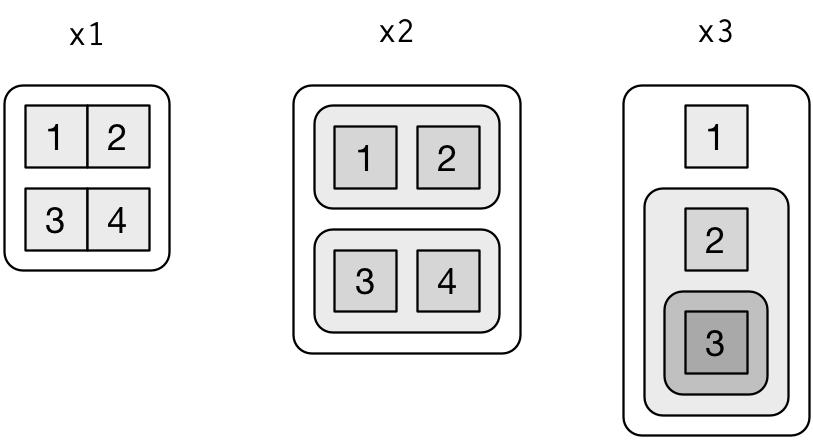
There are three principles:
-
Lists have rounded corners. Atomic vectors have square corners.
-
Children are drawn inside their parent, and have a slightly darker background to make it easier to see the hierarchy.
-
The orientation of the children (i.e. rows or columns) isn’t important, so I’ll pick a row or column orientation to either save space or illustrate an important property in the example.
Subsetting
The distinction between [ and [[ is really important for lists, because [[ drills down into the list while [ returns a new, smaller list. Compare the code and output with the visual representation in Figure 20.2.
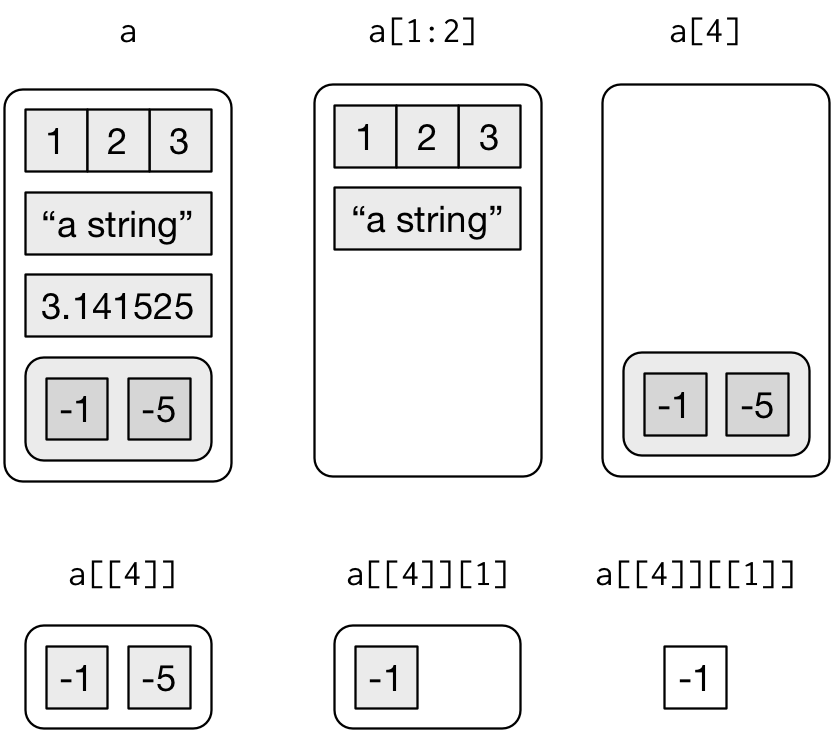
Figure 20.2: Subsetting a list, visually.
How to access components of a list?
Lists can be accessed in similar fashion to vectors. Integer, logical or character vectors can be used for indexing.
Indexing with [ will give us sublist not the content inside the component. To retrieve the content, we need to use [[.
However, this approach will allow us to access only a single component at a time.
How to modify a list in R?
We can change components of a list through reassignment. We can choose any of the component accessing techniques discussed above to modify it.
Notice below that modification causes reordering of components.
How to add components to a list?
Adding new components is easy. We simply assign values using new tags and it will pop into action.
How to delete components from a list?
We can delete a component by assigning NULL to it.
Matrices
In this article, you will learn to work with matrix in R. You will learn to create and modify matrix, and access matrix elements.
Matrix is a two-dimensional data structure in R programming.
Matrix is similar to vector but additionally contains the dimension attribute.
The dimension attribute is itself an integer vector of length 2 (number of rows, number of columns)
All attributes of an object can be checked with the attributes() function (dimension can be checked directly with the dim() function).
We can check if a variable is a matrix or not with the class() function.
How to access Elements of a matrix?
We can access elements of a matrix using the square bracket [ indexing method. Elements can be accessed as var[row, column]. Here rows and columns are vectors.
Using integer vector as index
We specify the row numbers and column numbers as vectors and use it for indexing.
If any field inside the bracket is left blank, it selects all.
We can use negative integers to specify rows or columns to be excluded.
Using logical vector as index
Two logical vectors can be used to index a matrix. In such situation, rows and columns where the value is TRUE is returned. These indexing vectors are recycled if necessary and can be mixed with integer vectors.
Using character vector as index
Indexing with character vector is possible for matrix with named row or column. This can be mixed with integer or logical indexing.
How to modify a matrix in R?
We can combine assignment operator with the above learned methods for accessing elements of a matrix to modify it.